BeachFinder / Tools

BeachFinder tools for partners, publishers and everyday beach checks.

A single place for BeachFinder utilities: add live beach planning signals to a website, install the mini app on desktop, and follow the tools we are preparing next.

Website embed

Iframe and script snippets · WordPress shortcode package · Light and dark widget themes

Installable mini app

Install from browser · Normal and compact views · Favorites kept on the device

MCP server · Live for AI assistants

Ask your AI assistant about any beach

BeachFinder now runs a Model Context Protocol (MCP) server. Connect it to Claude, ChatGPT or any MCP client and your AI can search 184,900 real swim spots worldwide, read live sea temperature, waves, wind and UV, pull community reports and compare beaches — right inside your AI assistant.

Live conditions from 184,900 worldwide swim spots
Beaches, surf, snorkel, whitewater, vanlife & guides
Real live data, not AI guesses
Endpoint
12 live tools
Read-only · no key required
search_beachessearch_swim_spotssearch_surf_spotssearch_dive_snorkel_spotssearch_river_whitewater_spotssearch_vanlife_spotsget_spot_conditionsget_spot_detailsget_community_conditionscompare_spotssearch_guidessearch_activity_providers
Connect in 30 seconds
  1. 1Open your MCP client (Claude Desktop, ChatGPT, Cursor or any MCP app).
  2. 2Add a new remote MCP server with the URL above.
  3. 3Ask it: what is the warmest beach near Valencia right now? It answers from live BeachFinder data.

Works with any Model Context Protocol client.

Frequently asked questions

What is the BeachFinder MCP server?

A free, read-only Model Context Protocol server at getbeachfinder.com/mcp that lets AI assistants like Claude and ChatGPT search 184,900 real swim spots worldwide and read live water temperature, waves, wind and UV.

How do I connect BeachFinder to Claude or ChatGPT?

In your MCP client, add a remote MCP server with the URL getbeachfinder.com/mcp — no API key needed — then ask about any beach and it answers from live BeachFinder data.

Is it free and what can it do?

Yes, it is free and read-only, with 12 tools covering beaches, surf, snorkel, dive, whitewater and vanlife spots, live conditions, community reports, spot comparisons, guides and activity providers.

BeachFinder Agent Skill

Teach your AI when BeachFinder is the right tool.

Install the standalone Skill so an assistant recognizes beach, water-condition, surf, dive, snorkeling, whitewater, vanlife and activity-provider requests, then routes them to BeachFinder. Pair it with the MCP server for live results.

No API key · read-only · integrity hash published in the discovery index. SHA-256: 0fa1bed7d80f158d...

  1. 01

    Recognizes the user's real intent.

  2. 02

    Chooses the right BeachFinder search.

  3. 03

    Returns useful BeachFinder pages and app links.

Skill = decision layer

Reusable instructions that tell an assistant when and how to use BeachFinder.

MCP = live data layer

Twelve read-only tools provide current conditions, comparisons, guides and providers.

Mobile widgets and watch app

BeachFinder is built for the moments before you leave.

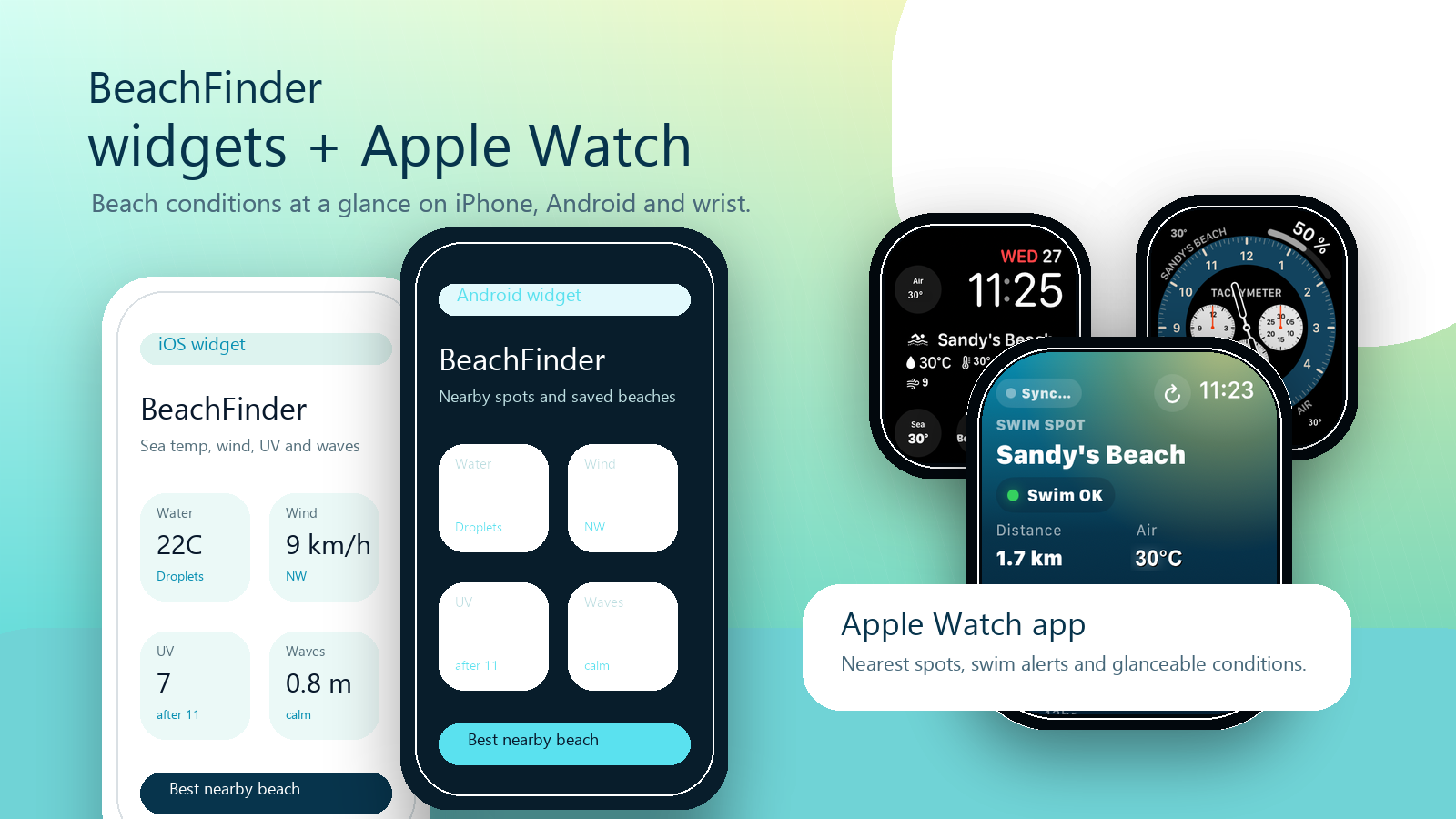
Use iOS widgets, Android widgets and the Apple Watch app to check water temperature, wind, UV, waves and nearby saved spots without opening a full map.

iOS widgets

Pin water temperature, wind, UV and favorite beach shortcuts on the iPhone home screen.

Android widgets

Keep nearby beach conditions and saved spots visible on Android before you start the trip.

Apple Watch app

Check the closest swim spot, quick condition signals and favorite alerts directly on your wrist.

BeachFinder iOS and Android widgets beside Apple Watch beach condition screens
Available now

Three tools are ready to use.

The live search widget lets anyone look up a city or beach and see real conditions. The embed widget is made for hotels, campsites, tourism pages and publishers. The installable mini app is the current base for the future Windows widget experience.

Search widget · Embeddable

Live beach search for your site

Drop a BeachFinder search box on your hotel, rental or blog page. Visitors type any city or beach and instantly see live water temperature, wind, UV and waves — plus the nearest real swim spots. Real data or a dash, never a fake number.

Any city or beach
Live water, wind, UV, waves
Free, unbranded iframe
Open the widget
BeachFinder
City, beach or place…
Water 21CWind 14 km/hUV 7.2Waves 0.8 m

Website embed

Beach conditions widget for any destination page.

Generate an iframe or WordPress shortcode that shows nearby beaches, photos, water temperature, wind, UV, waves and useful guide shortcuts.

Iframe and script snippets
WordPress shortcode package
Light and dark widget themes
BeachFinder
Website embed
Water 21C
Wind 14 km/h
UV 7.2
Waves 0.8 m
BeachFinder
Beaches near Biarritz
Beach guides
Installable mini app

Windows-ready beach dashboard for quick checks.

Use the PWA on desktop today: geolocation or city search, compact mode, saved spots, quick map access and the core water, wind, UV and wave signals.

Install from browser
Normal and compact views
Favorites kept on the device
Installable mini app
BeachFinder
Compact
Biarritz
Water 21CUV 7.2Wind NWWaves 0.8 m
Install from browser
Normal and compact views
Apple Watch

The watch app is for quick beach decisions, not long browsing.

BeachFinder on Apple Watch keeps the important beach signals glanceable: closest spot, swim status, water and air temperature, wind, waves, and favorite alerts.

Nearest spots

Open the watch and compare nearby swim spots without pulling out the phone.

Swim and surf alerts

Favorite alerts keep the thresholds that matter most visible at wrist level.

Watch-face glance

Complications can surface the selected beach, water, waves and air signals during the day.

Safety stays local.

The watch app is a planning shortcut. Always follow local flags, lifeguards, closures and official advisories before swimming.

Coming later

This page can grow into the BeachFinder toolbox.

The next tools should stay useful and sober: practical planning utilities, partner distribution helpers and share formats that point back to real beach pages.

Planned

Share cards

Clean cards for hotels, tourism offices and social posts, generated from real BeachFinder spot data.

Next

Partner kits

Ready-made copy, logos and install notes for WordPress, Webflow, Wix, Squarespace and local publishers.

Draft

Data notes

Clear documentation for what BeachFinder signals mean, where they come from and how partners should present safety limits.

The tools should help people decide, not just decorate a page.

BeachFinder tools are built around useful signals: distance, photos, water temperature, wind, UV, waves, amenities and nearby alternatives. They should always remain planning aids, with local flags and official advisories as the authority for safety.